Alpha · Foundry VTT v14
An AI game master for Foundry VTT
Director of Realms runs games in Foundry VTT v14. It can run the whole session so everyone gets to play, help a human GM with the bookkeeping, or just build you a map. It's in Alpha at the moment, so there's no public download yet.
Go on, roll it. Click the die or press Enter.
Whatever your table plays
It has dedicated support for D&D 5e, Pathfinder 2e, Star Wars FFG, ALIEN and Blade Runner, and copes with other systems too. You'll still need your own rulebooks though.
Current build v0.10.1588 · the development repository's main branch, checked every few minutes
Who's making this, and where it's at
I'm Joel, and Director of Realms is made by me, on my own, as A Hill to Die On. No team, no investors, just a lot of evenings.
It's in Alpha. Some of what's on this site works today, some of it is half built and some of it isn't in yet, and the screens change from one build to the next. D&D 5e gets tested the most; the other systems are coming along. Prices for the paid tiers haven't been announced yet, and I'll announce them before they open.
If you want to follow along, the Patreon is free to join and that's where the monthly updates go. The Discord is the quickest way to talk to me, and there's r/DirectorOfRealms on Reddit too.
What's in it
The GM, the maps and the paperwork
It's all one module, so the bit running the game knows what the map builder made and what happened last session.
AI GM
Narration, hidden-DC skill checks, NPC turns, private asides and table safety. Run the whole table, or back up yours.
More on the AI GMMapmaking
Seeded layouts from 565 floor plans, furnished rooms, doors, lights and fog. No image AI needed for the default map.
More on mapsCampaigns
Generate an adventure or bring your own book. Story spines, quests, journals, recaps and twenty save slots.
More on campaignsLiving worlds
Canon memory, nine-axis relationships, NPC dossiers, danger clocks and promises that come due.
More on memory and NPCsYour AI
Local runtimes or cloud providers, a model for each job, live cost tracking and caps that stop spending before it starts.
More on choosing your AI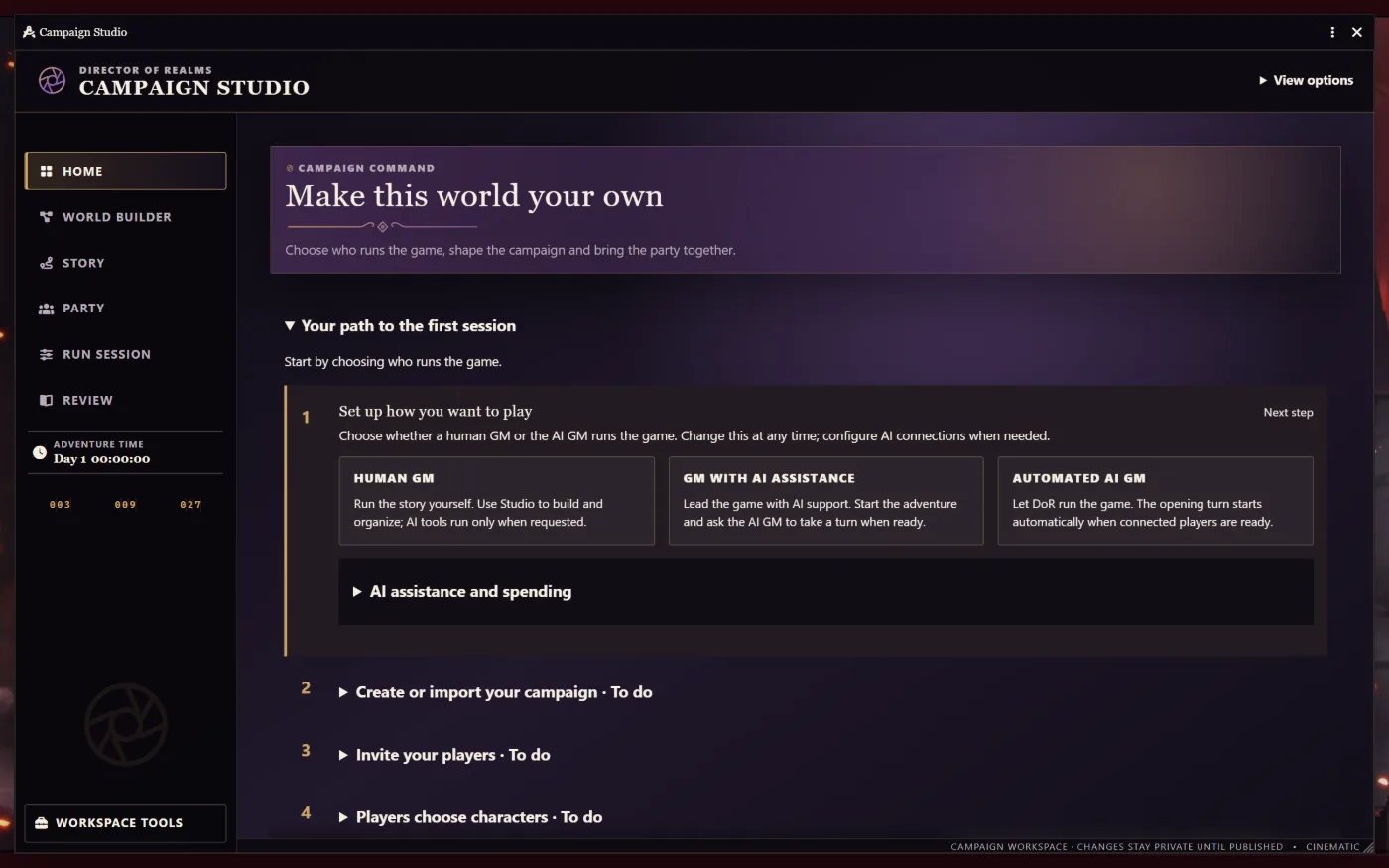
Play modes
How much do you want it to do?
There's one setting for it, and it applies everywhere at once.
Everyone gets to play
For solo play or a full table without a human GM. Players choose characters and press Ready; the Director opens the adventure and takes its turns from there.
- Opens the adventure itself once every player is ready.
- Takes NPC combat turns and passes the turn back to the players.
- Tells a human when it's stuck. Problems are whispered to Trusted Players, with a one-click recovery.
You GM, it helps
You GM; the Director prepares, suggests and handles the busywork, and waits for you to start the adventure.
- Ask the AI GM for private advice, or rules answers with cited sources.
- Hand off NPC combat turns while you focus on the players.
- Preview maps privately before your players see them.
Just the tools
Autonomous Director turns are switched off. Reach for DoR's tools when you want them and ignore them when you don't.
- Generate maps and campaigns on demand.
- Browse the NPC roster and the relationship web.
- Ask for a tactical suggestion on any NPC's turn.
A turn, step by step
What happens when a player does something
Say a player types "I search the desk". This is what the Director does before the story moves on.
How good the narration is depends a lot on the AI model you pick. There are some tested starting points on the Your AI page.
- Ready buttons
Everyone's ready
Each player presses Ready. When the whole table is ready, the Director takes its turn, so nobody has to fetch the GM.
- In character, or out
You act in chat
Actions and quoted speech are your character. A message in (parentheses) or starting “ooc” gets an out-of-character answer that doesn't move the scene.
- Skill checks
The Director asks for a roll
It names the skill, keeps the DC hidden, and waits. You roll from your own character sheet, as you always would.
- Resolution
The dice decide first
Success or failure is worked out against the hidden DC before a single word of the outcome is written.
- Narration
The story answers you
Short narration of what your action did, never your character's words or choices. GM-only notes, DC numbers and hidden names are scrubbed out first.
- Combat AI
The monsters take their turns
In combat the Director picks targets, moves around walls, uses each NPC's real attacks and passes the turn on, in D&D 5e and other supported systems.
- Memory
It writes it all down
Turn summaries, open threads and relationship changes are recorded in the world, then read back into the next turn.
- Session end
A hook, then a recap
“End session” closes on a hook the story already set up, then posts a recap built only from what was recorded.
Your AI
Use your own AI, on your machine or in the cloud
It works with Ollama, LM Studio, Unsloth Studio, LocalAI and KoboldCpp if you'd rather keep it on your own computer, or with a key from a cloud provider you already use. You can pick a different model for each job, see what it's costing as you play, and set a cap so it stops before it goes over.
- API keys stay in the GM's browser. They are never written into the shared world.
- Session and daily caps stop text, vision, image and speech calls at the limit you set.
- No model needed to lay out maps, store memory or run the world simulation.
- Director
- Local · a 20B-class instruct model
- Facilitator
- Local · a 4B instruct model
- Painter
- Local · ComfyUI
- Surveyor
- Cloud · a vision model
- Session cap
- $1
- Daily cap
- $3
The model sizes are tested starting points. The caps are just examples, not prices or default settings. The module counts spend in US dollars.
Pricing
Nothing's on sale yet
There are five software tiers planned, starting with a free one, but none of them are open yet. I'll announce prices before they are. If you use a cloud AI provider, they bill you directly, not me.
Your players are already making a terrible decision
Roll for initiative.
Follow along for free on Patreon. The software itself comes later.