Mapmaking
Maps built from a plan, so the walls match the picture
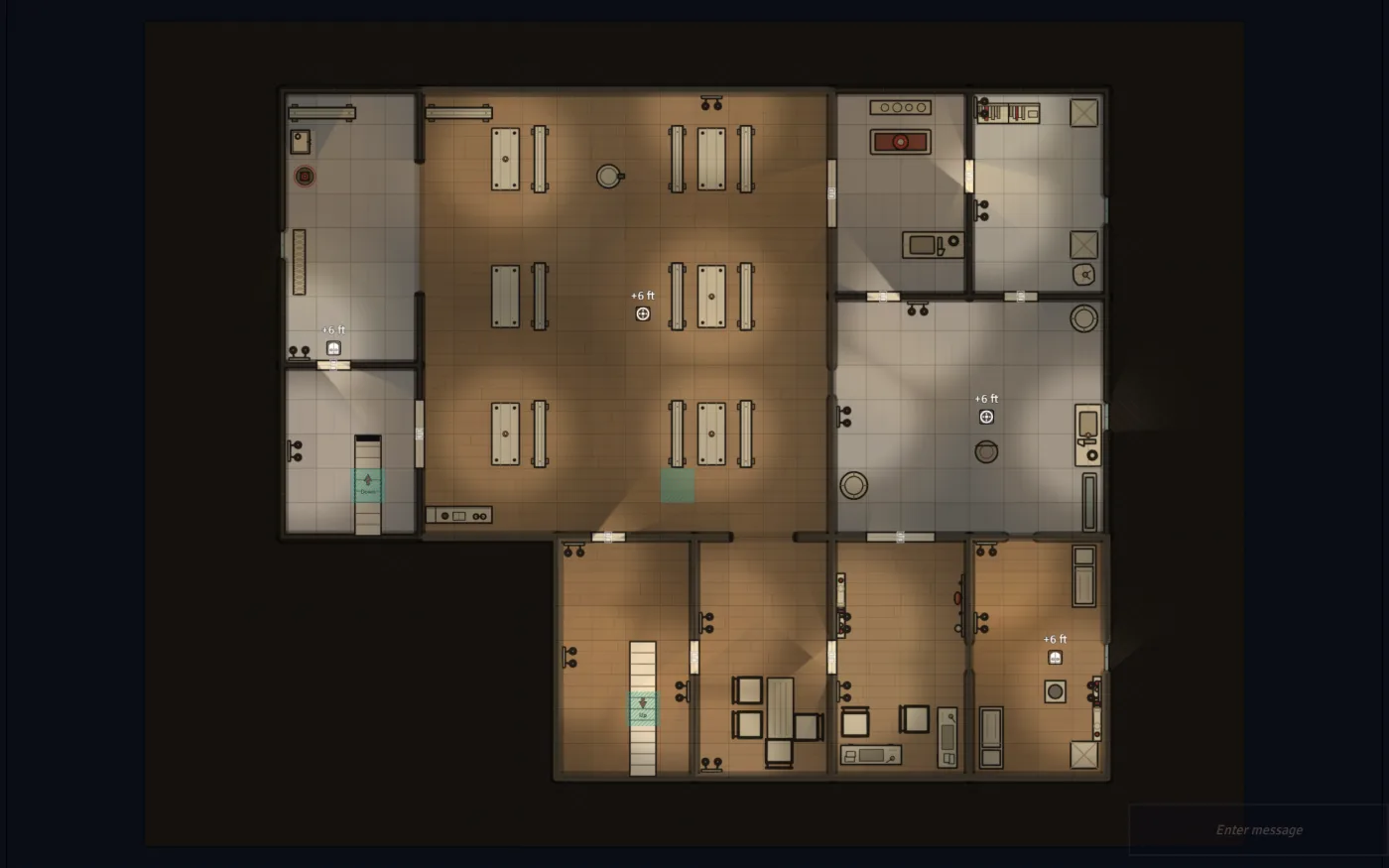
The Architect lays out every map from a seed - same seed, same map - and Director of Realms builds a playable Foundry scene from that single plan: grid, walls, doors, windows, lights, fog of war and furnished rooms. No AI decides where a wall goes, and the default map needs no image model at all.
Seeds
Same seed, same map
The Architect is procedural code, not a language model, so a map can always be rebuilt exactly. Roll three d20s to make a seed, then replay it and watch the same rooms, doors and furniture come back.
Illustrative This little generator runs in your browser to show the principle. The real Architect works from 565 floor plans and open-ground recipes, plans a walkable route from entrance to objectives to exit, and builds a full Foundry scene.
From request to scene
How a map gets made
Ask for “a flooded chapel crypt” and this is what happens before your players see a single tile.
- Request
Ask for a place
A GM clicks Generate Map, or the Director asks for a new scene during play. Your explicit choices always win.
- Transit
Doors to the world first
Arrival and exits are fixed before anything is drawn, mirroring how the party left the previous map.
- Architect
Pick the plan
The request is matched to one of 565 floor plans or an open-ground recipe, and framed from Focused to Sprawling.
- Architect
Lay it out
Rooms and corridors are placed from the seed along an entrance, objectives, exit route, with branches and loops. Sealed rooms get doors.
- Scene
Build the scene
Grid, fog of war and token vision; walls and low see-over walls; secret and locked doors; glass windows that block movement but not sight.
- Render
Light it and paint it
Switchable lights, then a background painted from the same geometry in your chosen theme, plus a separate GM key.
- Placement Grammar
Furnish it
Walking routes between doors are reserved first, then each room's focal piece, then its furniture groups.
- Meaning
Give it a story
Room notes, GM-only trap and ambush zones that alert the AI GM, and the points where the next map joins on.
Placement Grammar
Furnished rooms
A library gets shelves on its walls and a desk with its chair. A hall gets a long table with seats that face it. Furniture is placed as groups, backs onto real walls, and never blocks the path between a room's doors.
- Every prop drawn from directly above, so it reads cleanly on a top-down map.
- 31 room roles and 62 furniture groups, from forge-and-anvil to altar, lectern and throne.
- Interactive props with collision that changes with their state, and optional light, sound and effects.
Illustration in the site's colours. In Foundry, maps are painted in your chosen theme.
Maps that connect
Maps that join up
Entrances and exits are decided before a map is drawn. Leaving one map along a road starts the next on a matching road at the opposite edge, and heading back returns the party to where they left.
- 25 kinds of entrance and exit, from roads, bridges and fords to stairs, hatches and airlocks.
- Party tokens land at the arrival point, not in the middle of nowhere.
Up the stairs
Buildings with more than one floor
Multi-storey buildings and ships' decks are built as stacked Foundry v14 Levels inside one scene, and every floor is checked to be reachable from the one below.
- Twelve historical ship plans among the 565 floor plans.
- Six eras: historical, contemporary, science fiction, fantasy, post-apocalyptic and prehistoric.
Where you can go
Not just dungeons
Dungeons, interiors, caverns
Crypts, keeps, taverns and caves, laid out room by room from the floor-plan library.
Eight natural biomes
Forest, desert, mountain, wetland, arctic, jungle, shoreline and volcanic ground, among 26 open-ground recipes.
Hamlets, docks, graveyards
Hamlet greens, market squares, street strips, docks, battlefields, farmsteads, camps and ruin fields. Full towns and cities aren't generated yet.
Four map themes, plus Canvas classic and automatic selection:
- Parchment & ink default
- Holo blueprint
- Terminal green
- Noir schematic
Painter & Surveyor
It uses your art before it makes any
When a scene needs tokens, portraits or scene art, the Painter reuses what you already own before it generates anything.
Reuse before you pay
It looks through your reviewed private art, then compendium entries, then world actors, and only generates the gaps.
Cloud or local
OpenAI, Gemini, Stability, FLUX (via Black Forest Labs, Replicate or Together), Fireworks, Recraft, or Automatic1111/Forge and ComfyUI on your own GPU.
A second pair of eyes
With a vision model set up, the Surveyor checks each rendered map against the request, up to three times by default, and makes decoration-only fixes between tries. It never moves a wall.
Bring your own battlemaps
Import a PNG, JPEG or WebP and, with a vision model, DoR proposes walls, doors, windows, lights, ambient sound and fog. A publisher's own walls and lights are kept.
Rate the maps you get
Give a map one to five stars and quality tags. Opted-in ratings steer future map prompts, and poorly rated maps aren't reused.
Questions
Questions people ask
Is the Architect an AI?
No. It's seeded procedural code. A language model can help name a place or describe an unusual structure, but no model ever supplies coordinates, walls or doors.
Do I need an image model or an API key for maps?
Not for the default map. Composed maps are painted from the layout itself. An optional AI surface texture costs one image request per scene, and tokens and portraits use the Painter.
Can I use my own tiles and map packs?
From Just A Flesh Wound you can point DoR at your own tile library with a manifest file. On every tier you can import finished battlemaps and let the Painter reuse art from your compendiums before it generates anything. On Free, generated maps are Focused or Compact, up to 32 by 24 grid squares; paid tiers open every size.
Does it generate whole towns and cities?
Not yet. It builds hamlet-scale villages, market squares, street strips, docks and other settled places, plus individual buildings from the floor-plan library.
Interested?
Follow along while I build it
Still in Alpha, so things will change. Follow along for free on Patreon; the software itself comes later.